
While Google Maps does work in South Korea for basic searches and general subway lines, it often suffers from missing location data, outdated business information, and frequent routing errors-especially for walking paths and driving directions. To avoid getting stuck in narrow alleyways or missing highway exits, using Korea’s dedicated navigation apps is far more accurate and reliable: use NAVER MAP for walking and public transit, and switch to TMAP if you plan on driving or renting a car.
Why google Maps Has Limitations in South Korea
Due to local data and security regulations, global mapping services cannot access the country’s full high-precision spatial data. As a result, Google Maps lacks reliable turn-by-turn walking guidance, live transit tracking, and real-time road traffic updates. Local platforms update their geospatial data continuously, making them essential tools for exploring Seoul, Jeju Island, and regional road trips without navigation headaches.
Quick Guide: When to Use Which App
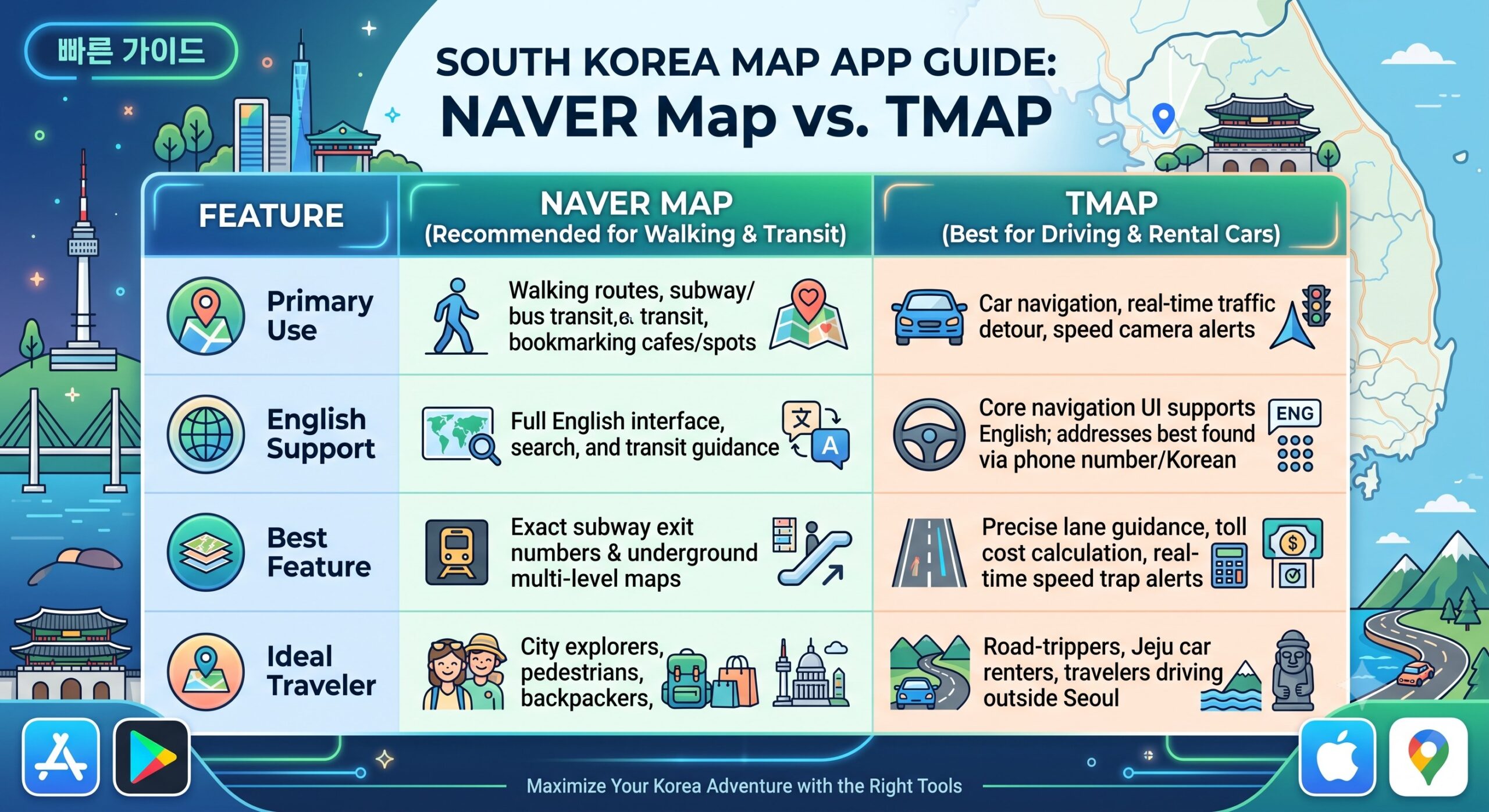
1. NAVER Map: The Ultimate Walking & Transit Guide
If you are exploring Korean cities on foot or via public transportation, NAVER Map is the undisputed top choice for international travelers.
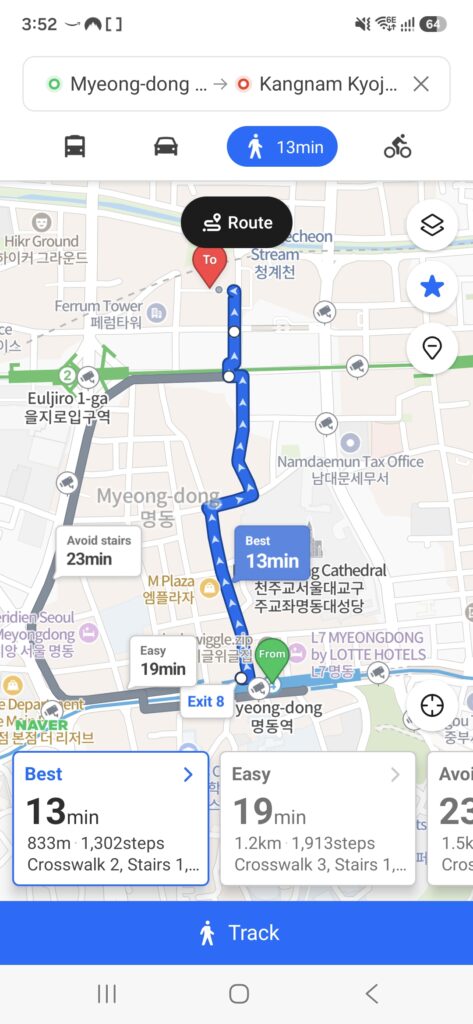
- Turn-by-Turn Pedestrian Navigation: Navigates through intricate winding alleyways, staircases, and pedestrian shortcuts that Google Maps completely misses.
- Subway Fast-Transfer Details: Shows the exact subway train car (e.g., Car 5-3) for the fastest line transfers and the closest numbered exit to your destination.
- Indoor Station Navigation: Multi-floor visual layout maps for massive transit hubs like Gangnam, Hongdae, and Seoul Station so you never get turned around underground.
How to Set Up NAVER Map:
- Download NAVER Map from the iOS App Store or Google Play Store.
- Go to Settings (Gear Icon) > Language and select English (also supports Japanese and Simplified / Traditional Chinese)
- Log in with an Apple or Google account to save and color-code your custom pins into curated travel lists.
2. TMAP: The Undisputed King of Driving Navigation
If you are renting a car in Jeju Island, Gangwon-do, or taking a scenic coastal road trip, TMAP is the gold standard navigation used by virtually all Korean taxi drivers and locals.
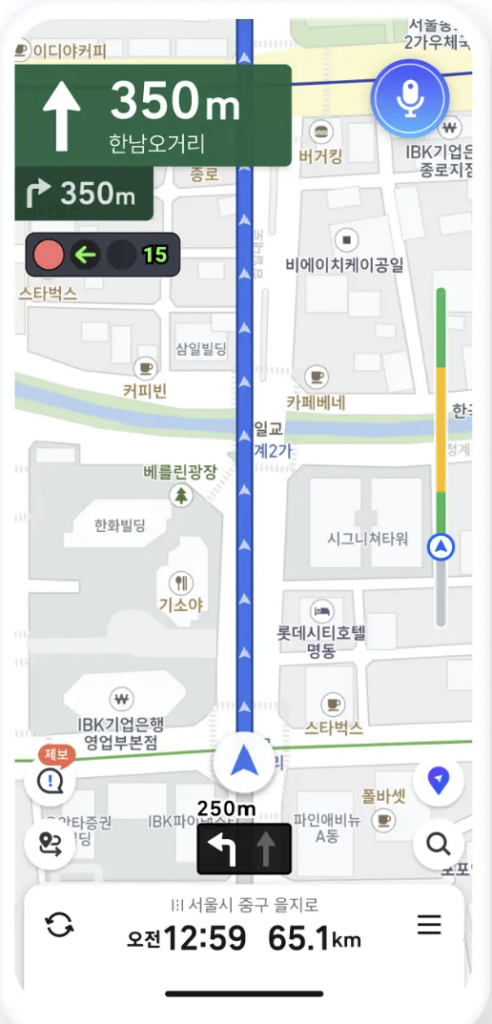
- Real-Time Dynamic Rerouting: Powered by massive live traffic data across the country, TMAP instantly recalculates routes around sudden congestion, roadwork, and accidents.
- Speed Camera & Section Control Alerts: Korean roads feature strict speed enforcement cameras and average speed zones. TMAP provides audio and visual countdown warnings to help you avoid heavy traffic fines.
- Complex Highway & Lane Guidance: Clear visual overlays show exactly which colored lane (pink or green highway guidance lines) to follow before approaching complex interchanges and toll plazas.
3 Pro Hacks for Smooth Navigation in Korea
- Searched by Korean Phone Number: If an English name or address fails to show up on TMAP or NAVER MAP, simply paste the venue’s 9-11 digit Korean phone number (e.g., 02-123-4567 or 064-123-4567) directly into the search bar for instant pinpoint accuracy.
- Pair with Papago: Download Naver Papago alongside your map apps. Copying the Korean business name or road name directly into your navigation app ensures zero search errors.
- Follow Subway Exit Numbers When Walking: City directions in Korea are anchored by numbered subway exits. Always check the designated exit number (e.g., “Myeongdong Station Exit 8”) before heading above ground to make walking effortless.